EXPLORER 710: Connectivity for a field news crew
News crews travel to where events happen, and terrestrial connectivity may be unavailable at the filming location. Define the outcome: sending a finished package for a bulletin or arranging a live report. These are different production workflows. Choose a portable Cobham EXPLORER 710 BGAN terminal alongside a plan for getting footage to the output editor and responding to changes in conditions.
Request a quote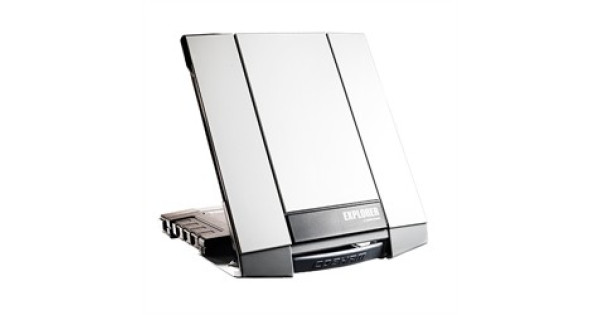
Start with what production needs to receive
Consider a small crew with a reporter, camera operator and person responsible for transmission. After filming, the newsroom needs the material by an agreed deadline. For a recorded package, the crew can prepare a short version, agree on the transfer procedure and wait for confirmation. A live report requires the field crew and studio to work together at the scheduled time. The two video workflows have very different requirements.
Before buying, meet briefly with the output editor. Does the newsroom need a finished clip or source footage for editing? How long will it remain timely? Can a recorded report replace the live contribution? These answers define connectivity requirements better than a preference for the highest-end terminal. The newsroom sets the acceptable quality, and the supplier helps select equipment for that workflow.
A recorded package gives the crew more options
A recorded report provides a defined transfer object: an agreed file or a sequence of files. The crew can separate a short version for timely publication from a larger archive. Production should make that decision, because compressing or trimming a file without agreement can leave the editor without the required audio, titles or footage for editing.
Agree beforehand on how receipt will be confirmed. A completed upload on the reporter’s side does not establish that the editor found the material and opened it. Define feedback stages: received, playable and accepted for production. Retain the source material under newsroom procedure until work on the bulletin is complete. This workflow is independent of the terminal brand.
Plan a live report with the studio
The manufacturer describes the EXPLORER 710 as a portable BGAN terminal suitable for applications including video reporting from remote locations. It is a relevant option for field crews. Agree on the application, transmission mode and service with the receiving studio. Terminal specifications alone do not establish on-air quality over the selected service.
Before departure, the studio and crew should agree on who contacts the reporter, who cues the start, how feedback is conveyed and what happens if the connection drops. Agree on how a live exchange with the presenter will run. Buying a terminal cannot complete broadcast preparation without that plan.
| Production task | What the newsroom agrees | What to confirm for connectivity |
|---|---|---|
| Finished short news package | Version format and receipt deadline | Transfer method and access for the receiving side |
| Source footage for editing | Required clips and their sequence | Workload and selected file-transfer service |
| Live report | How the studio works with the reporter | Application, transmission mode and service terms |
| Recorded alternative to live | When to switch to the backup plan | How the recording reaches the newsroom |
Locations can change while responsibilities stay clear
The filming location and connection point may differ. Show the crew’s technical lead the expected conditions and movement plan. They can decide how to position and use the equipment based on the documentation for the exact version. Coordinate the reporting and technical plans so it is clear who stays with the connection, accompanies the reporter and contacts the newsroom.
Discuss shift length and available power. Even if all devices work individually, a small crew can be held up by missing connections or unsuitable power at the site. Quote a working package for the devices the crew actually uses. Agree on the accessories and terminal as a single priced package. An itemised list alone does not establish readiness.
Prepare the primary and fallback production plans
The editor chooses the fallback: move the live slot, send a recording, use footage already received or finish the assignment another way. Agree on it while the crew can still reach the studio. This reduces deadline improvisation and clarifies the role of the satellite connection on this assignment.
The current EXPLORER 710 price is in the product listing. It covers equipment. We confirm actual contents, availability and lead time in the quotation. Activation and service plans are agreed separately. Describe the filming area, production format, receiving system, operating duration and crew devices. Include the receiving city and organisation details. We will match the request to the offered version and quote the agreed working package as a whole.
- Choose the production format
- Agree on reception with the studio
- Select the package and service
- Prepare a fallback plan
Newsroom selection workflow. Confirm service terms and equipment suitability for the particular assignment.
Questions before buying
Does the EXPLORER 710 provide a complete live broadcast on its own?
Consider the terminal alongside the application, connectivity service and receiving studio. Agree on the format and live conditions for the newsroom’s workflow.
What is in the equipment package?
The catalogue gives the EXPLORER 710 equipment price. Confirm the contents in the quotation. Activation and the service plan are priced separately.
Can I request a full package for the field crew?
Yes. Describe crew devices, power, filming area and how material reaches the newsroom. We will agree on the required accessories and total package price in the quotation.
EXPLORER 710 in our catalogue
Cobham EXPLORER 710 BGAN
Agree on equipment contents in the quotation. Actual contents, availability and lead time are confirmed in the quotation. The working package is priced as a whole. Activation and the service plan are agreed separately.
Request a quoteDocumentation: Cobham Satcom — EXPLORER 710.